Manipulating Waveforms
Creating Waveforms
In yesterday’s lab, we learned that we represent sound waves as vectors of floating-point numbers in the range -1.0 to 1.0.
Thus, to generate sounds, we simply need to provide such a vector to the sample-node function of the audio library.
For example, we saw how to generate white noise by randomly generating either 1.0 or -1.0 for each sample:
(import audio)

; The default sample rate for sample-node is 16000 hz
(define sample-rate 16000)
(define duration 2)
(define num-samples (* sample-rate duration))

(sample-node
  (|> (vector-range 0 num-samples)
      (lambda (vec)
        (vector-map (lambda (n) (- (random 2) 1)) vec))))
In this code snippet, we create a pipeline of numbers in the range 0 to num-samples - 1.
Think of these numbers as the index n of each sample from the sound wave.
We then transform each index into an appropriate random number by using random.
We perceive tones as sound waves with patterns occurring at a particular frequency. We, therefore, can create a tone by constructing a sound wave with a regularly occurring pattern. There are a number of fundamental waveforms in digital audio.
As an example of this, let’s create a sound wave consisting of a square waveform. Within a single occurrence of the square waveform pattern:
- The first half of the samples are the minimum possible amplitude,
-1.0. - The second half of the samples are the maximum possible amplitude,
1.0.
Let’s write a function that creates a vector of samples corresponding to a single square waveform.
We can create this vector simply to the white noise example above: transform a vector of sample indices into a vector of samples corresponding to a waveform.
We’ll decompose this problem in a pipelining fashion: we’ll first write a function that transform one index into a square wave sample and then use vector-map to apply that function to every element of our vector.
; (index->square-sample n total-samples) -> vector?
;   n: integer?, non-negative
;   total-samples: integer? non-negative
; Returns a vector of sample values corresponding to a square wave.
(define index->square-sample
  (lambda (n total-samples)
    (if (< n (/ total-samples 2))
        -1.0
        1.0)))

(|> (vector-range 2)
    (lambda (vec) (vector-map (lambda (n) (index->square-sample n 2)) vec)))

(|> (vector-range 10)
    (lambda (vec) (vector-map (lambda (n) (index->square-sample n 10)) vec)))
Observe in that output that the first half vector values is -1.0 and the other half is 1.0.
To apply index->square-sample to create a clip that consists of many square waves, we can think of this
as a mapping problem.
Suppose that we want to create square waves that are 2 samples in length over total clip of 10 samples.
Image the indices of this vector of 10 samples.
We need to map these indices into values in the range 0—1 for our square waveforms of length 2.
0 1 2 3 4 5 6 7 8 9
↓ ↓ ↓ ↓ ↓ ↓ ↓ ↓ ↓ ↓
0 1 0 1 0 1 0 1 0 1
What function when given the top number gives you the bottom number?
It turns out this is the remainder function!
(remainder n k) returns the remainder of \(n \div k\).
(|> (vector-range 10)
    (lambda (vec)
      (vector-map
        (lambda (n) (remainder n 2))
        vec)))
In general, remainder allows us to perform “modulo” arithmetic where we want to consider numbers up
to a certain value (2 in this case) and “wrap around” when we reach either range of values.
Let’s combine these two concepts to generate a square wave at 440 Hz (concert A pitch):
(import audio)

; The default sample rate for sample-node is 16000 hz
(define sample-rate 16000)
(define duration 2)
(define frequency 440)
(define num-samples (* sample-rate duration))
(define samples-per-wave (/ sample-rate frequency))

(define index->square-sample
  (lambda (n total-samples)
    (if (< n (/ total-samples 2))
        -1.0
        1.0)))

(sample-node
  (|> (vector-range 0 num-samples)
      (lambda (vec)
        (vector-map
          (lambda (n)
            (index->square-sample (remainder n samples-per-wave) samples-per-wave))
          vec))))
Waveform Processing
Because our audio clips are simply vectors of floats, processing audio clips amounts to transforming these vectors of floats, typically with vector-map!
There are many operations that we can perform over our audio clips, e.g.,
- Combine clips so that the sounds play at the same time.
- Take a single clip and modify it to have pulses, giving the effect of discrete notes between played.
- Adding effects to the clip such as echo and reverb.
As an example, we’ll describe a simple technique to modify a sound clip to give it a pulse. You’ll implement part of this technique for the reading question and then finish it off in lab!
ASDR Envelopes
So far, our sound waves have been continuous tones. How might we synthesize notes or pulses of sound? We can do so by applying an envelope to our wave which will control its volume. Sound envelopes are a very simple example of an effect we can apply to a wave of sound.
Recall that the amplitude of a wave determines its volume. To create the effect of a “note,” we want to control the amplitude of the wave over time to simulate how the volume changes over the lifetime of a note. The standard ADSR envelope recognizes four such stages in the lifetime of a note:
- Attack: the period where the wave ramps up from zero amplitude to its peak amplitude.
- Decay: the period when the wave ramps down from its peak to a designated sustained volume.
- Sustain: the period when the wave maintains its designated sustained volume.
- Release: the period when the wave moves from its sustain level back to zero amplitude.
Here is a diagram illustrating the different portions of the ADSR envelope (from the Wikipedia article on the subject):

Relative to the sound samples, we can think of each individual point in the envelope as a multiplier. For the \(i\)th sample of the sound clip, we would multiply it by the \(i\)th point of the envelope to contain its volume.
There is an art to picking appropriate values for each of these stages to create a realistic sound note. For our purposes, let’s first create a simple envelope that:
- Has an instantaneous attack, i.e., the pulse starts at maximum volume.
- Has no decay or sustain; the remaining portion of the envelope releases from maximum volume back to rest.
This envelope might look like this:
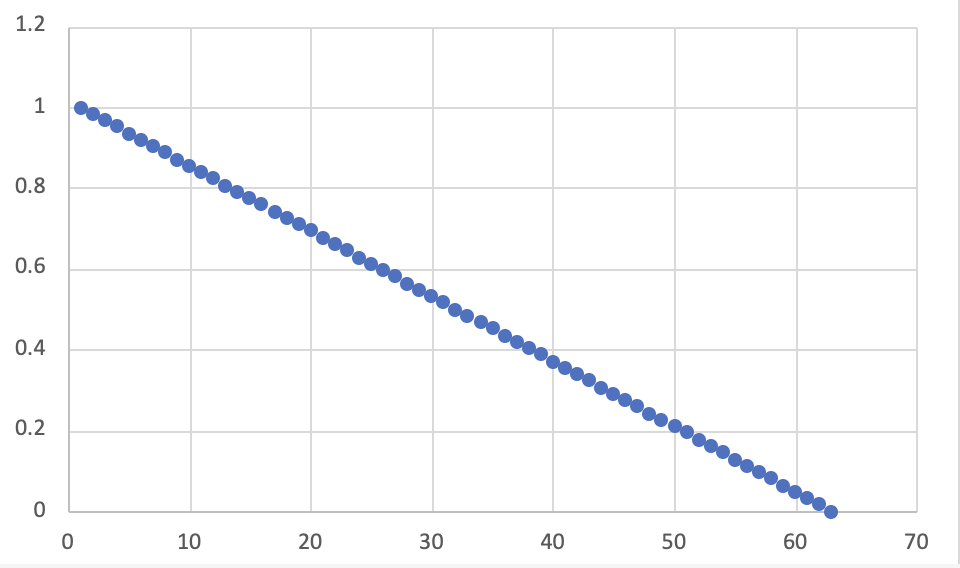
With the start of the envelope being 1.0 decreasing linearly to 0.0 by the end of the envelope.
If we take our sine wave from before:
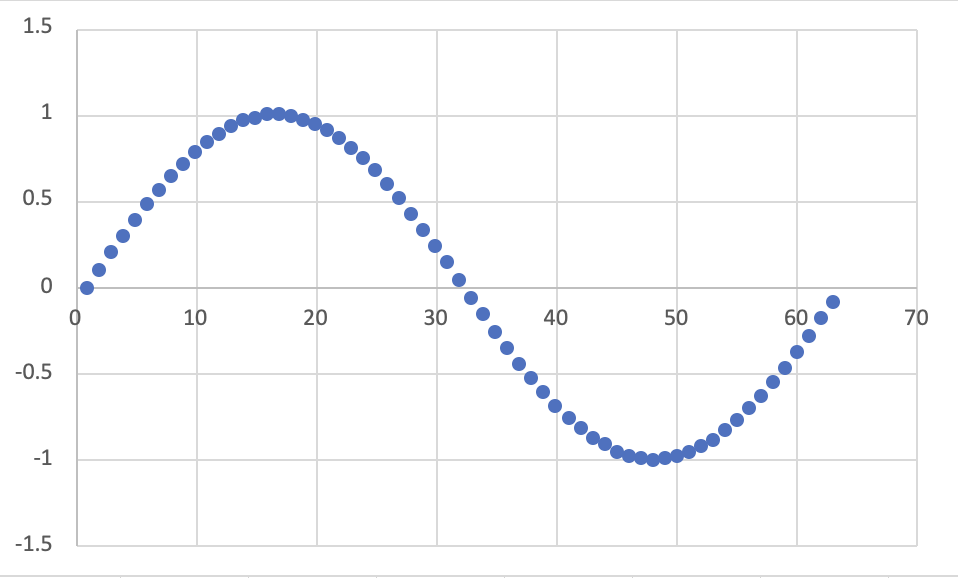
We can apply the envelope by taking the \(i\)th sample and multiplying it by the \(i\)th point of the envelope. This results in a modified sine wave:

The result is a pure sine tone that instantaneously sounds loud and then decays over the duration of the clip to no volume.
ASDR envelopes are a great example of the power of manipulating sound as vectors of floating-point numbers. We can do lots of interesting transformation over sounds just by applying our big-ticket operations over the samples!
Self-Checks
Problem: Making the Envelope (‡)
Follow the example of index->square-sample and create a function simple-envelope that takes total-samples, the total number of samples in the clip as input.
The function then outputs the envelope described above:
- The envelope starts at
1.0and linearly decays to0.0over its lifetime.
Here is an example of its usage for reference:
(simple-envelope 1)
> (vector 1.0)

(simple-envelope 5)
> (vector 1.0 0.8 0.6 0.4 0.2)

(simple-envelope 10)
> (vector 1 0.9 0.8 0.7 0.6 0.5 0.4 0.3 0.2 0.1)
In lab, you’ll apply this function to your synthesized sounds to make notes!