Mini-Project 2 : Working with the basic datatypes
For this project, you will submit one file: basic-datatypes.scm.
Some background
As our programs get more complicated, the structure of our code and good names and formatting are not enough to make our code readable and correct. We need to rely on extrinsic means to ensure these things. To ensure that our code is readable, we use documentation to capture aspects of our code that are not obvious upon inspection. To ensure that our code is correct, we use tests that codify the correctness our programs through concrete examples.
During our week on software engineering fundamentals, we’ll discuss these concepts in more detail. For now, we’ll employ some basic documentation and testing for our program.
Documentation
For each function that you write in this mini project, include a function comment that captures the types of the function as well as describes its output in a sentence or two. For example, here is a function comment for a function that finds the minimum of three numbers:
;;; (min x y z) -> real?
;;;   x : number?
;;;   y : number?
;;;   z : number?
;;; Returns the minimum of x, y, and z
(define min-of-three
  (lambda (x y z)
    (cond
      [(and (<= x y) (<= x z))
       x]
      [(and (<= y x) (<= y z))
       y]
      [else
       z])))
The function comment is a stylized comment that consists of the following three components:
(min x y z) -> number?: the signature of the function which names its arguments and describes the output type of the function. In Racket, we express the types with the predicate functions that we use in code to test whether an expression has that type. For example, this signature says thatminhas three arguments,x,y, andzand that it produces a number (as tested by thenumber?function).x : number? ...: the types of each of the parameters mentioned in the signature. Like the return type of the function, we document the types of the parameters with the predicates that we would use in code to test values of those types.Returns the minimum of x, y, and z: finally, we include a brief sentence or two description of the behavior and output of the function. Here, the behavior of the function is simple, so we comparatively have little to say: the function returns the minimum of its arguments.
Tests
Up until this point, we have asked you to experiment with the functions that you write in the explorations window to check for correctness. This has the upside of being fast, but if you change your code, you need manually type in all those tests again which is tedious (which in turn makes it less likely you’ll recheck the correctness of your code). A better solution is to codify your tests in your code so that you can rerun the tests at will.
During our unit on software engineering fundamentals, we’ll introduce you to a library that makes test authoring and execution a breeze. For now, we’ll simply have you call your functions on a variety of inputs within your file. For example, the reading on characters and strings introduced a function that tests whether a value is a lowercase character:
(define lower-case-char?
  (lambda (x)
    (and (char? x)
         (char-lower-case? x))))
To test this function, we can call this function on several inputs and verify that the function behaves as expected. Note that we should choose a variety of inputs that exercise the different possibilities that the code considers, for example:
(lower-case-char? 5)    ; #f
(lower-case-char? #\a)  ; #t
(lower-case-char? #\C)  ; #f
(lower-case-char? "a")  ; #f
Setting up your file
You will have one file for this assignment, basic-datatypes.scm.
Here’s the start of the file.
;; CSC-151-NN (TERM)
;; Mini-Project 2: Working with the basic datatypes
;; YOUR NAME HERE
;; YYYY-MM-DD
;; ACKNOWLEDGEMENTS:
;;   ....

(import image)
(import music)
Part 1: String Utilities
As you have likely discovered by now, the built-in Scheme procedures don’t always immediately do what we want.
For example, although we can use a combination of integer? and string->number to determine if a string contains only digits, we would prefer not to write (integer? (string->number str)) again and again and again, particularly since we might later realize that that solution is not perfect.
When most programmers discover that they need to do the same thing again and again? They create a library of utility procedures that they plan to use in other procedures. Although you are just beginning your experience as a Racket programmer, you will still find it useful to create your own set of utilities.
For each of the following functions, do the following:
- Write several tests that describe how the function should work. Note that you haven’t written the function yet! While this seems backwards, this test-driven design is useful in the design process to help you concretize the behavior of a function.
- Write documentation for the function as outlined above. Again, you haven’t written the function yet! Documenting before you implement a function is another useful technique to solidify a design before you go to implementation.
- Finally, implement the function! In implementing your function, you will learn new things about the design, correct mistakes, etc., so you should update your tests and documentation accordingly.
In your tests, make sure to consider edge cases the exercise the “boundaries” of your code, e.g., the string is empty or the string contains an unexpected character.
(slight-trim str)takes a stringstras input and returnsstrand removes a single leading space and a single trailing space on the ends ofstr, if they exist.(starts-with? s1 s2)takes two stringss1ands2as input and determines ifs1start withs2.(ends-with? s1 s2)takes two stringss1ands2as input and determines ifs1ends withs2.-
(all-digits? str)takes a stringstras input and determines ifstrcontains only digits.(Hint: to do this, you’ll need to use the
string->listto turn the string into a list of characters you can manipulate. From there, a creative use offilterandlengthwill get you the desired result.)
Part 2: Ehrenstein Illusions
(Credit to Marty Stepp and Stuart Reges from the University of Washington for creating the original version of this assignment!)
An Ehrenstein Illusion is an optical illusion consisting of a collection of concentric circles and a diamond contained in a box. While we write the code to create a diamond, the circles will cause the sides of the diamond to look wavy!
For this part of the mini-project, you must write at least two functions:
-
(ehrenstein length n box-color circ-color outline-color): creates an image that contains a single Ehrenstein illusion with side lengthlength,ncircles, with the givenbox-colorandcirc-colorfor the box color and circle color, respectively.outline-colordetermines the color of the outline of the circles and the diamond. -
(grid m n img): creates an image that is a grid ofmrows andncolumns of the provided imageimg.
Importantly, you will need to capture the repetitive nature of the concentric circles and their size relative to the size of the overall box.
Recall that (range n) produces a list of numbers in the range 0 to n-1.
I highly recommend you grab a piece of paper for this and use to sketches to develop a formula for computing the size of the circle based on its “index” drawn from (range n).
With these functions, you should reproduce the following images as definitions in your program.
-
ehrenstein-1: a single Ehrenstein illusion of length200,5circles, a"red"box,"yellow"circles, and"black"outline.
-
ehrenstein-2: a single Ehrenstein illusion of length100,10circles, an"aqua"box,"orange"circles, and"black"outline.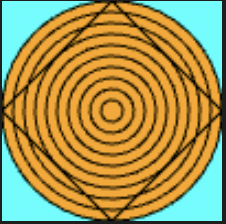
-
ehrenstien-3: a single Ehrenstein illusion of length50, no circles, a"white"box and circle, and"green"outline.
-
ehrenstein-4: a \(3 \times 3\) grid of Ehrenstein illusions of length100,10circles each, and a"red"box,"yellow"circle, and"orange"outline.
-
ehrenstein-5: a \(3 \times 2\) grid of Ehrenstein illusions of length50,5circles each, and a"blue"box,"green"circles, and"white"outline.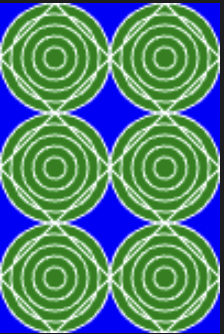
In addition to writing these functions, you should:
- Appropriately decompose your function into smaller functions as you identify different sub-components of the image.
- Give complete documentation strings for all functions that you write.
Submitting your work
Turn in your completed basic-datatypes.scm file to Gradescope.